2 min read
Agents can now query your database
 Kyle McLaren
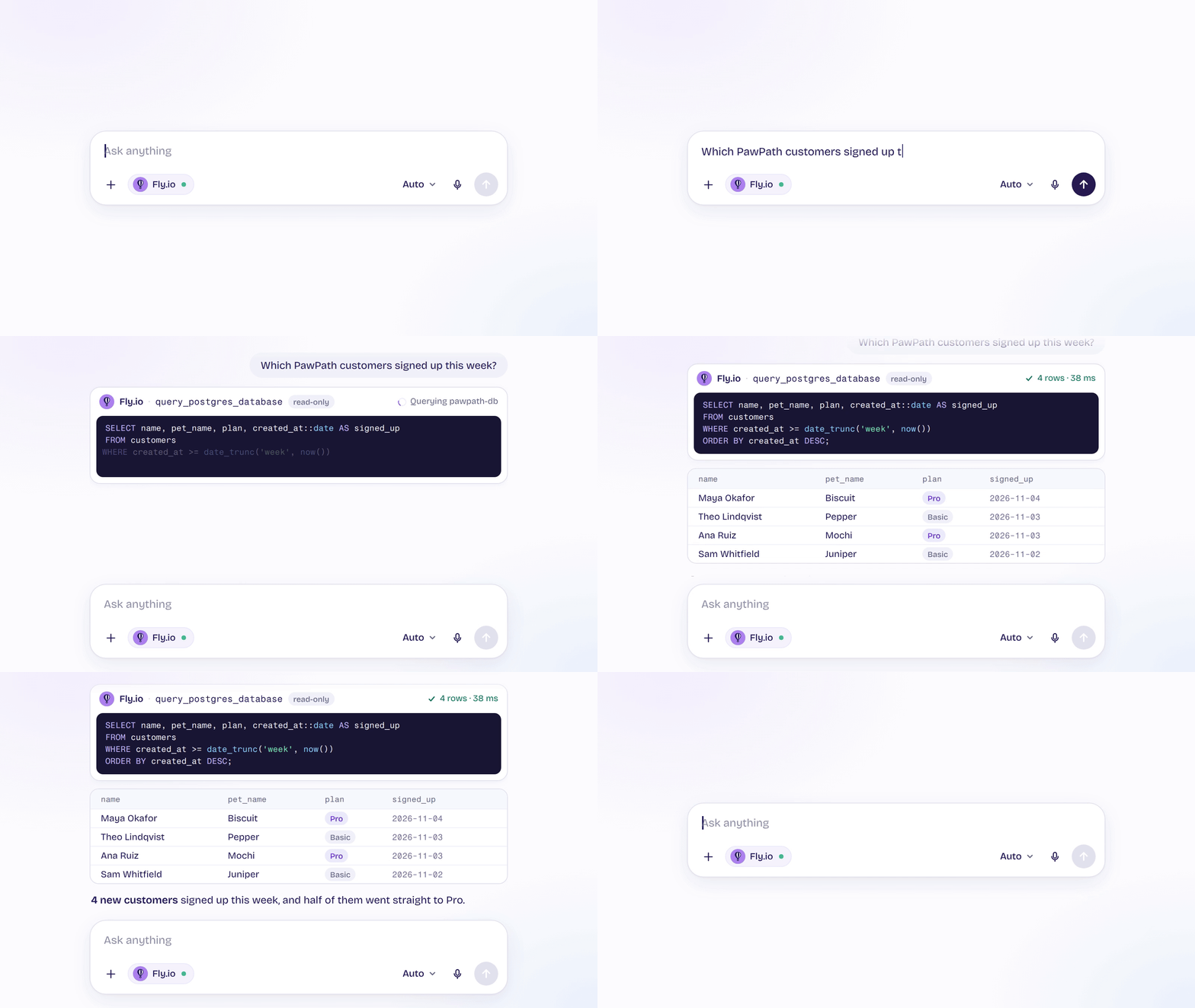
The Fly.io MCP server has a new tool, query_postgres_database. It lets ChatGPT, Claude, or any other MCP client run read-only SQL on your Managed Postgres databases. We quietly added MPG support after the initial MCP launch and it could manage clusters, but couldn’t look at the data in them.
When your agent calls the tool, it runs one query in a read-only transaction and returns the columns, rows, and row count. It can read all table data, but it can’t write data or change schema.
A few details
“Read-only” was kinda complicated: A read-only transaction in Postgres doesn’t block everything. Large-object functions like lo_create and lo_put can still store data. pg_logical_emit_message writes to the WAL, and rolling back a transaction doesn’t undo that. A query that starts with COMMIT; could try to step outside the transaction. So we closed each of those. The roles that run your queries can’t execute those write functions, transaction control is rejected, and every query is rolled back when it finishes.
We rolled it out while you slept: Those changes are part of the software we run alongside Postgres on every cluster. Updating it restarts machines and switches over the primary, so open connections drop. We don’t like to do that to everyone’s database at once, just for a new feature. Instead, each cluster gets the update at its next maintenance, in the maintenance window you chose.
You’ll need to do a re-auth dance: Querying your data has its own OAuth permission, fly:mpg:query. On the consent page it’s a separate checkbox, “Also let it read data with SQL”, and the page warns that it can read all table data. MCP clients like ChatGPT save the list of permissions they ask for when you first connect, and the consent page only shows what the client asks for. So a client you connected before fly:mpg:query existed won’t ask for it. Remove the connector and add it again to see the new permission.
Oh, it’s in the Machines API too
The MCP tool is built on a new Machines API endpoint, which you can call directly:
curl -X POST \
  -H "Authorization: Bearer $FLY_API_TOKEN" \
  -H "Content-Type: application/json" \
  -d '{"sql": "SELECT id, email FROM users ORDER BY id LIMIT 10"}' \
  https://api.machines.dev/v1/postgres/<CLUSTER_ID>/databases/<DATABASE_NAME>/query
Happy querying. We’d love to know how you’d use this in your workflows.