---
title: "Using TurboStream with the Fetch API"
description: "Achieving Single Page App level performance with Hotwire"
---
# Using TurboStream with the Fetch API

[Annie Ruygt](https://annieruygtillustration.com/)
[Fly.io](https://fly.io/) runs apps close to users around the world. This enables highly dynamic interactive forms, even in cases where a server interaction is required. [Give us a whirl](https://fly.io/speedrun/) and get up and running quickly.
Many people see Rails as a framework that will get you to IPO and beyond. I, personally, I’m more interested in the long tail of applications that are used by only a small group of people.
I wrote one such application to schedule heats for ballroom competitions, which I named [Showcase](https://github.com/rubys/showcase#showcase). That’s heats, like in a swim match, but where the women’s outfits are sequined and men may be wearing tails. One key difference: ballroom dances are performed by pairs of participants, which complicates scheduling as one person cannot be in two places at the same time.
Throughput isn’t a concern for the Showcase application, but latency is. If you are entering a large amount of data (in human terms, not in “big data” terms), you don’t want to wait for requests to be processed. Therefore server responses for trivial requests need to be seen as instantaneous, which is anything under 100ms.
The remainder of this post focuses on how forms in the Showcase application are made dynamic using [Hotwire](https://hotwired.dev/), combining a number of techniques that may not be obvious.
## Forms That Change
Forms can change based on user input for any number of reasons: drag and drop; selecting values from a drop-down menu; even submitting the form can cause new form fields to appear, disappear, or change. I’ll use a New Participants form to demonstrate:
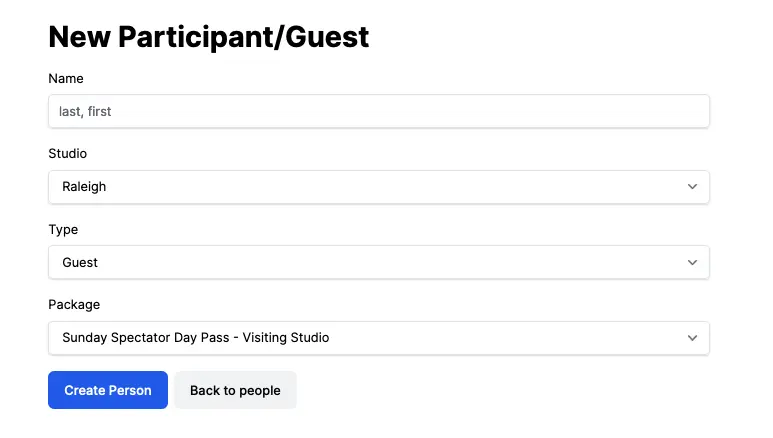
Not shown above are a number of hidden fields. If the participant’s type is Professional, additional fields will be added to the form to indicate whether the participant is a Leader or Follower (or both!). Students have additional fields including Level and Age categories, and even have a way to request that they not be scheduled at the same time as a friend or spouse so that they can video each other. Leaders have one additional form field where a back number can be entered.
A form with all of the input fields revealed looks like the following:
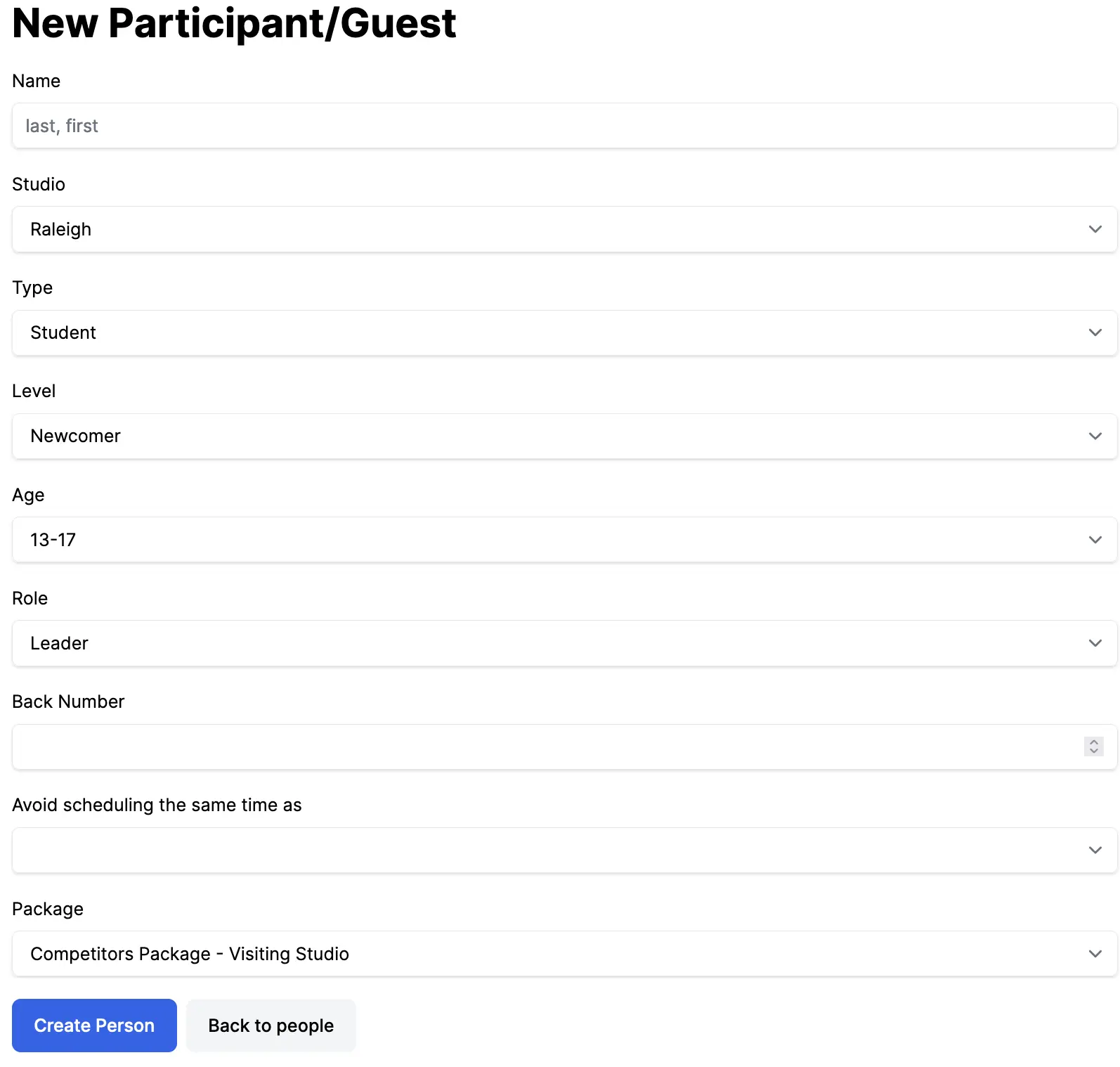
Hiding and revealing portions of the form is relatively straightforward, oftentimes it is as simple as placing lines of code like the the following in a [Stimulus](https://stimulus.hotwired.dev/) controller:
```
this.levelTarget.classList.remove('hidden');
```
Now I’d like to draw your attention to the the Package field in this form. It turns out that the list of packages to choose from depends on both the Studio and Type of the person being added or edited. The server knows how to construct the Package selection from that information.
A common approach to solving problems such as these is a [single page application](https://en.wikipedia.org/wiki/Single-page_application) which would involve client-side rendering of this part of the page, initially using either hydration on the client, possibly with server-side rendering (SSR).
The Hotwire approach is different. The content is placed into a [Turbo Frame](https://turbo.hotwired.dev/handbook/frames) and rendered on the server. The only role the client has in the process is to replace an element in the DOM with the new content.
Now lets look at how this is put together, starting with the HTML…
## Initial Render of the Form
The Showcase application makes use of both Stimulus and Turbo Frames.
Stimulus enables you to attach JavaScript controllers and actions to your HTML via `data-` attributes. Turbo Frames encourages you to split out content that may be replaced later into a [partial](https://guides.rubyonrails.org/layouts_and_rendering.html#using-partials). Both approaches are employed here.
Focusing on the portions of HTML that are related to the need to show the correct list of packages given the selected Studio and Type leaves the following portions of the form template, `_form.html.erb`:
```
<%= form_with(model: person, data: {
controller: "person",
id: person.id
}) do |form| %>
...
<%= form.label :type %>
<%= form.select :type, @types, {},
'data-person-target' => 'type',
'data-action' => 'person#setType',
'data-url' => type_people_path %>
...
<%= render partial: 'package', locals: { person: person } %>
<% end %>
```
Note the `data-url` attribute which identifies the route where POST requests will be sent.
And now, `_package.html.erb` which is a reusable partial enabling it to be both rendered within the initial form and later rendered separately:
```
<%= turbo_frame_tag('package-select') do %>
<% unless @packages.empty? %>
<%= label_tag :person_package_id, 'Package' %>
<%= select_tag 'person[package_id]',
options_for_select(@packages, @person.package_id || '') %>
<% end %>
<% end %>
```
Now that you have seen how the initial content is rendered, lets move on to how the frame gets replaced as the user makes their selections.
## Fetching New Content on Demand
This is where the Showcase application combines two techniques that may be a bit obscure.
The HTML form referenced a `person` stimulus controller. This controller has a number of responsibilities in the Showcase application. Here are the parts we’re interested in at the moment:
```
import { Controller } from "@hotwired/stimulus"
// Connects to data-controller="person"
export default class extends Controller {
static targets = ['studio'];
connect() {
this.id = JSON.parse(this.element.dataset.id);
this.token = document.querySelector(
'meta[name="csrf-token"]'
).content;
}
setType(event) {
fetch(event.target.getAttribute('data-url'), {
method: 'POST',
headers: {
'X-CSRF-Token': this.token,
'Content-Type': 'application/json'
},
credentials: 'same-origin',
body: JSON.stringify({
id: this.id,
type: event.target.value,
studio_id: this.studioTarget.value
})
}).then (response => response.text())
.then(html => Turbo.renderStreamMessage(html));
}
}
```
The `setType` method is invoked whenever the level selection changes. Looking again at part of the `form.select` input in `_form.html.erb`:
```
<%= form.select :type, 'data-action' => 'person#setType' %>
```
The `setType` method itself uses the [Fetch API](https://developer.mozilla.org/en-US/docs/Web/API/Fetch_API), passing in the body the `params` that will be made available to the controller. In this case, the `params` include the person’s `id`, `type`, and `studio.id`. The text of the response to this fetch request is extracted and then rendered as if it had been delivered via [TurboStream](https://turbo.hotwired.dev/handbook/streams).
There are two keys to making this work. Both are documented, albeit a bit obtusely.
First we need to deal with `X-CSRF-Token`. You will find it mentioned in the [Securing Rails Applications](https://guides.rubyonrails.org/security.html), as follows:
> By default, Rails includes an unobtrusive scripting adapter, which adds a header called X-CSRF-Token with the security token on every non-GET Ajax call. Without this header, non-GET Ajax requests won’t be accepted by Rails. When using another library to make Ajax calls, it is necessary to add the security token as a default header for Ajax calls in your library. To get the token, have a look at `` tag printed by `<%= csrf_meta_tags %>` in your application view.
The reference to an *unobtrusive scripting adapter* and *AJAX* are both anachronisms here, but the important essence here is that if you want non-GET HTTP requests to work you will need to extract the content from te `csrf-token` meta tag and place it in an `X-CSRF-Token` HTTP header.
To be fair, there are two alternatives to getting the CSRF token as was done here.
First, in some cases is possible to rewrite this particular request to use `encodeURIComponent` and HTTP GET, but in other cases (such as recording scores in the Showcase application), HTTP GET would not be appropriate. Passing JSON in request bodies is not only more convenient, but also can contain more complex nested data payloads than URL query strings.
Second, [requestSubmit](https://developer.mozilla.org/en-US/docs/Web/API/HTMLFormElement/requestSubmit) can be used to submit an entire HTML form. HTML doesn’t support nested forms, but you can add additional, completely hidden, forms as needed; copy the relevant values to the hidden form’s input fields; and submit them.
If either of these alternatives work for you, use what you feel most comfortable with. Oftentimes it is useful to have a third alternative, especially when that alternative requires less code. Drag and drop is an clear example where HTTP GET is not appropriate, and where it generally is more straightforward to issue a fetch call than it is to construct and update a hidden form and submit it.
---
The other important part is the method used to render the response. You will find this method mentioned in [Processing Stream Elements](https://turbo.hotwired.dev/reference/streams#processing-stream-elements):
> If you need to process stream actions from different source than something producing MessageEvents, you can use Turbo.renderStreamMessage(streamActionHTML) to do so.
To have found this you would have needed to look at the documentation for Processing Stream Messages to find the description of how to handle *non* -Stream Messages.
While the documentation is a bit obscure, the resulting code is fairly straightforward: extract the body of the fetch response as HTML, and pass that HTML to `Turbo.renderStreamMessage`.
Now that the Studio and Type have been submitted to the server, the server has to render the Package input part of the form with the right stuff.
## Rendering New Content
Excerpt of the method in `people_controller.rb` that generates responses to `post_type` requests:
```
def post_type
@person = Person.find_by_id(params[:id]) || Person.new
@person.studio = Studio.find(params[:studio_id])
@person.type = params[:type]
selections
respond_to do |format|
format.turbo_stream {
render turbo_stream: turbo_stream.replace('package-select',
render_to_string(partial: 'package'))
}
format.html { redirect_to people_url }
end
end
private
def selections
. . .
end
```
This is straightforward. An `@person` object is constructed based on the `params` in the request. A private method is called to populate the `@packages` instance variable. Finally a `turbo_stream.replace` response is produced including the rendered package partial. This is the same partial that was originally rendered in the form.
## You can play with this right now.
It’ll take less than 10 minutes to get your Rails application running globally.
[Try Fly for free →](https://docs.fly.io/rails)
## Summary
Overall, using `fetch` in response to DOM events, and processing the responses as if they were turbo stream messages, is a useful design pattern. Making it work required solving two problems: obtaining a CRSF token, and rendering a fetch response as a turbo stream messages.
On my development laptop, such requests can be processed quickly:
```
Completed 200 OK in 5ms (Views: 0.0ms | ActiveRecord: 0.4ms | Allocations: 7213)
```
This means that if you can deploy your app close to your users so that the network latency is minimal, you can actually produce results comparable to single page applications in terms of form changes being perceived as instantaneous by users.
I hope you found this post useful and can find interesting ways to apply this technique in your Rails applications!