---
title: "Securing Access to Livewire components with Inline Policies, Traits, and Middlewares"
---
# Securing Access to Livewire components with Inline Policies, Traits, and Middlewares

[Annie Ruygt](https://annieruygtillustration.com/)
Deploy now on Fly.io, and get your [Laravel app running](https://docs.fly.io/laravel) in a jiffy!
How do we safeguard Livewire components against unauthorized access? How do we restrict access to its view or specific action based on a current user’s permissions?
## Laravel Policies
In this article we’ll go through three different ways to restrict access to Livewire components with the help of [Laravel Policies](https://laravel.com/docs/10.x/authorization#creating-policies):
1. **Applying policies with authorization or gates** - to restrict access to an entire component view
2. **Applying policies within traits** - to reuse the same restriction across different components, either for the entire view or specific action
3. **Applying policies through middleware** - to restrict access to a Livewire component’s specific action
Version Notice. This article focuses on [Livewire v2](https://laravel-livewire.com/docs/2.x/quickstart), details for [Livewire v3](https://livewire.laravel.com/) would be different though!
## Set up
To start, we’ll create a “`ViewButton`” Livewire component with `php artisan make:livewire view-button`. This component will be responsible for two things: 1️⃣ Open a User’s profile page in a new tab, and 2️⃣Increment the number of times there was an attempt to visit the User’s profile.
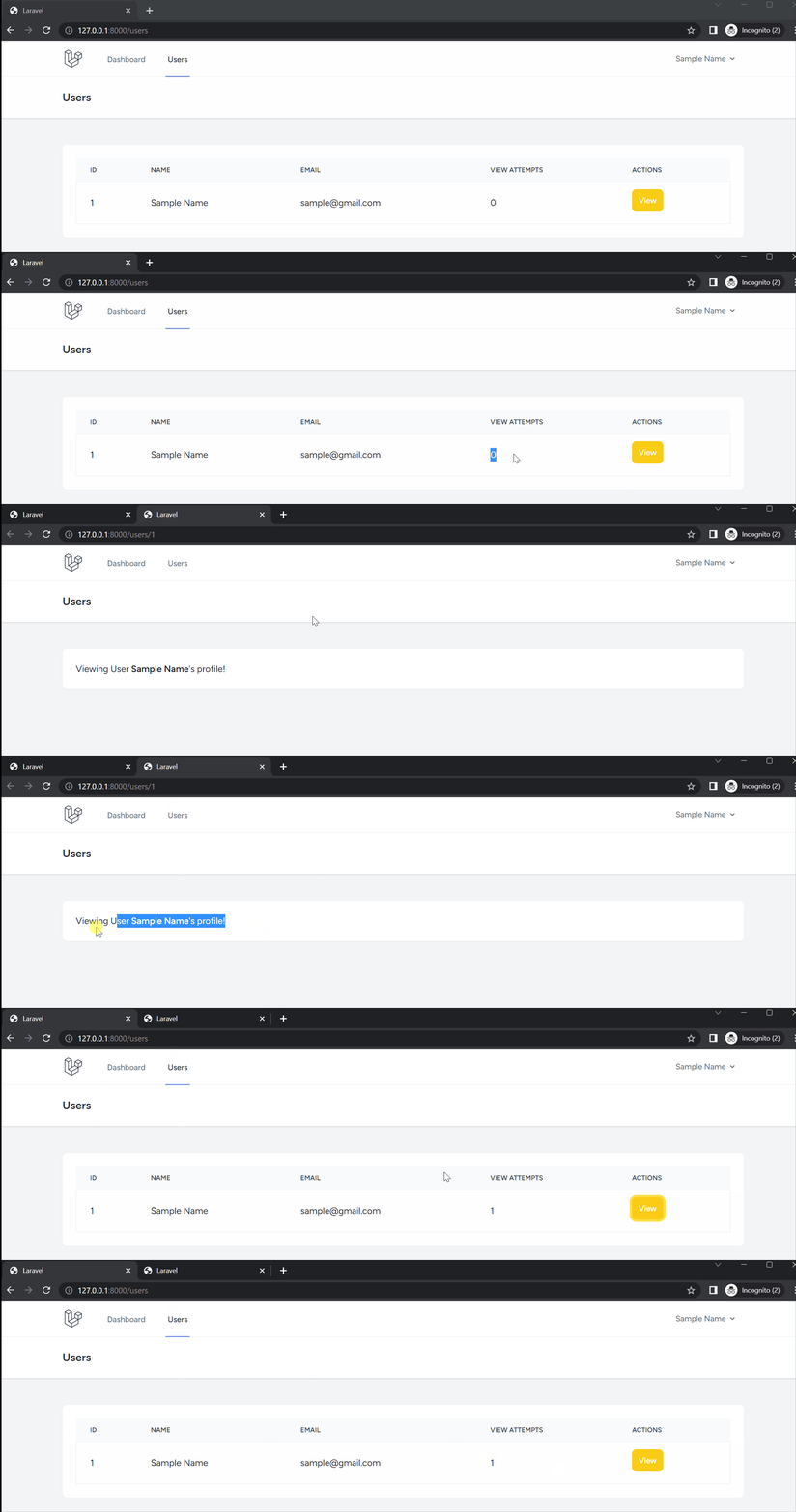
The component’s view will contain a button which will open a new tab with the User’s profile page, and call an `incrementAttempt()` method in the component on click:
```
{{-- resources/views/livewire/view-button.blade.php --}}
```
In the component, we’ll declare the public attribute `$userId` to determine the user selected for viewing, and the method `incrementAttempt()` which will increment the number of times there was an attempt to view the User’s profile:
```
/* app/Http/Livewire/ViewButton.php */
use App\Models\User;
class ViewButton extends Component
{
public $userId;
public function incrementAttempt()
{
$user = User::find($this->userId);
$user->increment('view_attempt');
}
}
```
Where do we get the `$userId`? We pass it down from a parent component, likeso:
```
@livewire('view-button', ['userId' => $user->id])
```
With our component set up, let’s put some restrictions on it 🔒
## Creating Our Policy
Let’s say, we don’t want just anyone to be able to view a user’s profile. We want to restrict access to only the user itself, or another user with either an `Administrator` or `Auditor` role. Let’s create a [Laravel Policy](https://laravel.com/docs/10.x/authorization#generating-policies) for this, run `php artisan make:policy UserPolicy`.
This will generate a file for us at `\app\Policies\UserPolicy`. In here we can create different methods representing different authorization checks, which we’ll use to restrict access to our Livewire component.
### Restricting Views with A Policy
Create a policy method that checks if a current user has permission to view a user’s profile. It will take in two parameters, `$loggedInUser` and `$userToCheck`. This will only “authorize” if the `$loggedInUser` is either an `Administrator`, an `Auditor`, or has the same id as the `$userToCheck`:
Notice the `UserLevel` class in the code? We’re [using enums](https://fly.io/laravel-bytes/user-levels-enums-and-policies-oh-my/#leveling-up-the-users) here to make our user roles readable.
```
/* app\Policies\UserPolicy */
use App\Model\User;
use App\Enums\UserLevel;
class UserPolicy
{
public function view( User $loggedInUser, User $userToCheck )
{
return $loggedInUser !== null &&
(
$loggedInUser->level == UserLevel::Administrator ||
$loggedInUser->level == UserLevel::Auditor ||
$loggedInUser->id == $userToCheck->id
);
}
```
Laravel [auto detects](https://laravel.com/docs/10.x/authorization#policy-auto-discovery) policies based on the model name. The policy above, `UserPolicy` will get matched to the `User` model and will automatically be made available to use through Laravel’s `authorizes` helper. However, if the policy name does not match with any model, make sure it is [registered](https://laravel.com/docs/10.x/authorization#registering-policies), otherwise, it will not be detectable in `authorize` helper.
## Applying Policies with Authorization or Gates
With our `view` policy setup above, let’s use it to restrict access to our `ViewButton` component’s view. One way to apply it is to use Laravel’s `authorize()` helper before we render the view of the component:
```
/* app/Http/Livewire/ViewButton.php */
+ use Illuminate\Foundation\Auth\Access\AuthorizesRequests;
+ use App\Models\User;
class ViewButton extends Component
{
+ use AuthorizesRequests;
public $userId;
public function incrementAttempt(){}
public function render()
{
+ $userToCheck = User::find($this->userId);
+ $this->authorize( 'view', auth()->user(), $userToCheck );
return view('livewire.view-button');
}
```
We pass our policy method’s name `view` to the `authorize` helper, along with the parameters the policy method takes in. If the policy method returns false, the `authorize` method will throw an `Illuminate\Auth\Access\AuthorizationException` exception:
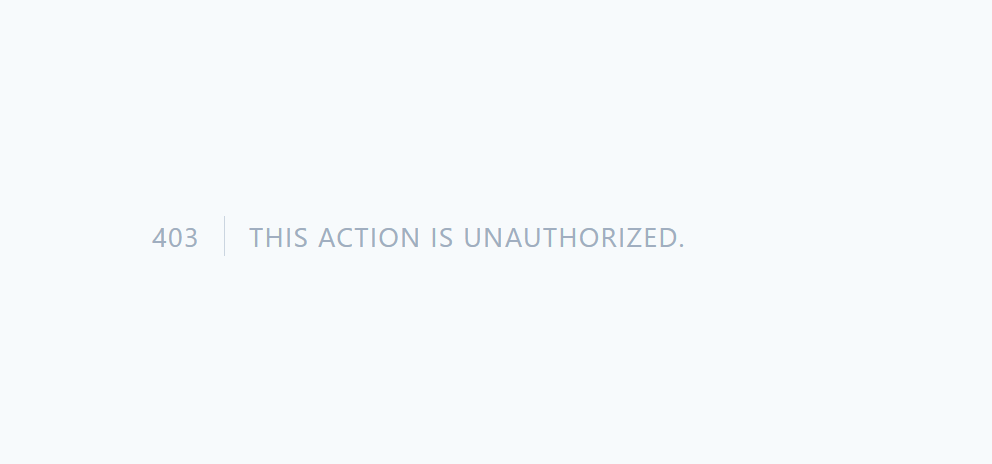
Hmmm. But. We want to still see other parts of our parent component. We just want to hide the `ViewButton` component. Let’s catch this exception, and return an empty element instead:
```
/* app/Http/Livewire/ViewButton.php */
public function render()
{
try {
$userToCheck = User::find($this->userId);
$this->authorize( 'view', auth()->user(), $userToCheck );
return view('livewire.view-button');
} catch (\Illuminate\Auth\Access\AuthorizationException $e) {
return '';
}
}
```
Of course, we can replace this try catch with Gates instead:
```
/* app/Http/Livewire/ViewButton.php */
use Illuminate\Support\Facades\Gate;
use App\Models\User;
class ViewButton extends Component
{
public $userId;
public function render()
{
$userToCheck = User::find($this->userId);
if( Gate::allows( 'view', auth()->user(), $userToCheck ) ){
return view('livewire.view-button');
}else{
return '';
}
}
```
Now, we can have our parent component and everything else with it, with the exception of the `ViewButton` component, unscathed: 
## Applying Policies within Traits
We might want to apply the same policy to another component. To avoid duplicating the work we just did above, we can enclose the policy check into a trait, and declare this trait in any Livewire component we want to restrict on the same policy!
Create a trait at `app\Traits\WithViewAuthorization.php`:
```
/* app\Traits\WithViewAuthorization.php */
use Illuminate\Support\Facades\Gate;
use App\Models\User;
trait WithViewAuthorization
{
/* Override th render method of any Livewire Component*/
public function render()
{
$userToCheck = User::find($this->userId);
if( Gate::allows('view', auth()->user(), $userToCheck) ){
return view( $this->viewPath );
}else{
return '';
}
}
}
```
Notice how we declared a `render()` method in our trait above? We’ll use this to render a Livewire component’s view instead of its normal render method. It should also be able to use the public attributes of our Livewire component, just like the `$userId`, and a new attribute, `$viewPath`( to determine our blade path! ).
Back in our `ViewButton` component, let’s revise it to:1️⃣ apply the trait above, 2️⃣ set the `$viewPath` value to the proper blade path, and 3️⃣ remove the `render()` method:
```
/* app/Http/Livewire/ViewButton.php */
+use App\Traits\WithViewAuthorization;
class ViewButton extends Component
{
+ use WithViewAuthorization;
+ public $viewPath = 'livewire.view-button';
public $userId;
- public function render(){}
}
```
Alright! Save the changes, refresh the page, and marvel at the use of traits 🪄
## Fly.io ❤️ Laravel
Fly your servers close to your users—and marvel at the speed of close proximity. Deploy globally on Fly in minutes!
[Deploy your Laravel app! →](https://docs.fly.io/laravel)
### Restricting Actions with A Policy
By hijacking the render method of our Livewire component, we’re able to restrict access to our component’s view. But. Let’s say, we want to make sure a specific action from our component is only made available based on another policy?
Let’s re-imagine our `incrementAttempt()` logic. Maybe. we’d want to only increment if the current user has an `Auditor` role? Let’s create another policy in our `UserPolicy`:
```
/* app\Policies\UserPolicy.php */
public function increment( User $loggedInUser )
{
return $loggedInUser !== null &&
$loggedInUser->level == UserLevel::Auditor;
}
```
Then, back in our `WithViewAuthorization` trait, let’s add a new method called `allowIncrement()` that will check the `increment` policy above:
```
/* app\Traits\WithViewAuthorization.php */
public function allowIncrement()
{
$userToCheck = User::find($this->userId);
return Gate::allows('increment', auth()->user(), $userToCheck );
}
```
Since our Livewire component `ViewButton` is using the above trait, it can call the new method above in any of its own action methods:
```
/* app/Http/Livewire/ViewButton.php */
public function incrementAttempt()
{
if( $this->allowIncrement() ){
// Increment user profile view count
}else{
// Handle unauthorized increment attempt,
// maybe log this, or just ignore it
}
}
```
## Applying Policies through Middleware
Aside from applying policies directly or through traits, we can also apply them through middleware. First, make sure to remove the `allowIncrement()` check above. We’ll be applying policy checks through middleware, so we’ll no longer need it.
Once done, create a middleware to apply our `increment` policy above, run: `php artisan make:middleware EnsureIncrementAllowed`.
To apply this middleware to the `incrementAttempt()` in our Livewire component, we’ll have to: 1️⃣ Add it to a middleware group that’s included in [Livewire’s middleware_group config](https://laravel-livewire.com/docs/2.x/authorization#:~:text=an%20entry%20to-,middleware_group,-in%20the%20livewire). Create a new middleware group, and include our middleware there:
```
/* app/Http/Kernel.php */
protected $middlewareGroups = [
'policies' => [
\App\Http\Middleware\EnsureIncrementAllowed::class,
]
```
2️⃣ Pull the [livewire config file](https://laravel-livewire.com/docs/2.x/installation#publishing-config), then include our new middleware group `policies`:
```
/* config/livewire.php */
'middleware_group' => ['web','policies'],
```
Once this middleware group is included in Livewire’s config, all subsequent requests to any Livewire components will pass through this middleware group. But, we only want to apply this middleware to `ViewButton`‘s call to its `incrementAttempt()` action.
To do so, we’ll have to specify in our middleware logic to apply itself only to the route used by Livewire’s request to `ViewButton`—“livewire/message/user-view-button”—and make sure the action being called is `incrementAttempt()`:
```
/* app/Http/Middleware/EnsureIncrementAllowed.php */
class EnsureIncrementAllowed
{
public function handle(Request $request, Closure $next): Response
{
// Make sure we're applying to proper route & action
if(
$request->path() == 'livewire/message/user-view-button' &&
isset($request->updates[0]['payload']['method']) &&
$request->updates[0]['payload']['method'] == 'incrementAttempt'
){
// Apply policy check
if( !Gate::allows('increment', auth()->user() ) ){
return response()->json([
'effects'=>['html'=>null, 'dirty'=>[], 'dispatches'=>[]],
'serverMemo'=>['checkSum'=>$request->serverMemo['checksum']]
]);
}
}
}
}
```
Notice above how we respond back with `effects` and `serverMemo` data? This is because Livewire [expects a response](https://fly.io/laravel-bytes/php-js-livewire/#the-wire-that-is-metadata) with these data. In fact, we can even go so far as to dispatch our own custom browser event from here! Let’s say `incrementNotAllowed`:
```
if( !Gate::allows('increment', auth()->user() ) ){
return response()->json([
'effects'=>['html'=>null,'dirty'=>[],
'dispatches'=>[
['event'=>'incrementNotAllowed','data'=>[]]
]
],
'serverMemo'=>['checkSum'=>$request->serverMemo['checksum']]
]);
}
```
Which we can listen for in our livewire view:
```
{{-- resources/views/livewire/view-button.blade.php --}}
```
Of course, this method is a bit inconvenient, specially with the need to check for the route being used, and the action being called. But, it’s a good start to applying policies through middleware.
## Summary
In this article we went through three different ways of restricting access to a Livewire component’s view and its action.
The first being the application of in-line policy checks with `authorizes()` and `Gates` provided by Laravel. The second by transferring the in-line authorization checks into a trait, includable in our Livewire component. And finally, the last through checks from a middleware( from which we even managed to send back a browser event! ).
Of course, these are not the only ways to restrict access to Livewire components. There are tons more! Like calling a `@can()` [blade helper](https://laravel.com/docs/5.1/authorization#within-blade-templates) before rendering a component, or directly applying checks before triggering an action.
There’re many ways to safeguard access to a Livewire component, applying “policy gates” is just one way!