---
title: "Bridging PHP and JavaScript with Livewire"
description: "This article talks about the role of metadata tossed between the livewire server and client and how it has paved the way for easy communication between PHP and JS using Livewire."
---

# Bridging PHP and JavaScript with Livewire

![The background is set in a dark, but star-studded outerspace. Two planets are bridged together with a winding bridge, similar to two slightly-curled ribbons enclosing a highway road. The first planet to the left is aquatic with a pink hue, while the planet to the right is a terrain containing "JS" and "PHP" engraved in its soil.](https://fly.io/laravel-bytes/php-js-livewire/assets/0_cover.webp)

[Annie Ruygt](https://annieruygtillustration.com/)

This article talks about communication between PHP and JavaScript using Livewire. Livewire’s faster close to your users. Deploy your Laravel app globally with [Fly.io](https://docs.fly.io), your app will be flying in no time!

What makes [Livewire](https://laravel-livewire.com/docs/2.x/quickstart) a gem is how it easily allows us to communicate data, methods, and events across PHP and JavaScript.

No long code, no extra syntax—just straightforward, easy PHP-JavaScript communication.

Version Notice. This article focuses on [Livewire v2](https://laravel-livewire.com/docs/2.x/quickstart), details for [Livewire v3](https://livewire.laravel.com/) would be different though!

## The Livewire Bridge

Livewire bridges the gap between PHP and JavaScript with concise communication syntax.

No longer would we need to write up our client’s http requests to call methods or get response data, nor would we need to dig up client arguments from the request received by our server.

Today, we’ll skim just a teensy bit beneath the surface of Livewire, and understand the role of its magical `metadata`.

From there we’ll see how tossing `metadata` between server and client creates the bridge for PHP and JavaScript communication.

Along the way we’ll create a simple [chat-bot application](https://blue-sun-6217.fly.dev/talk-to-me-page):

| ![A page containing a text box and a button with the ability to send messages to a chat bot. At the center of the page is a radiant, blue to pink colored heading "Talk to Me". Below it is a text box next to a button labeled "Send". A pointer moves from the bottom right towards the text box, and types "What's up?" inside the box. Then, the pointer clicks the button next to the text box. The browser responds to this action by displaying the text message a level below the text box, and makes a call to the server. Another level below the new displayed message, three bouncing, adjacent circular loaders is shown while the client waits for a response from the server. The loader eventually disappears and is replaced with a message from the server: "Up? I'm up in the clouds.".](https://fly.io/laravel-bytes/php-js-livewire/assets/1_demo.gif) |

| --- |
| The user can send any message at the click of a button, and the chat bot will respond with its answer. |

It’s a bit rudimentary, but it will get us through some useful PHP-JS syntax:

1. [Triggering a PHP method from JavaScript](https://fly.io/laravel-bytes/php-js-livewire/#calling-php-methods-from-javascript)
2. [Dispatching a JavaScript event from PHP](https://fly.io/laravel-bytes/php-js-livewire/#php-invokes-javascript-events)
3. [Listening and Reacting to a PHP event from JavaScript](https://fly.io/laravel-bytes/php-js-livewire/#reactive-javascript)
4. [Reading a PHP variable from JavaScript](https://fly.io/laravel-bytes/php-js-livewire/#javascript-reads-php-vars)

You can check out our full repository [here](https://github.com/KTanAug21/sample-app#talk-to-me). You can also view the page [here](https://blue-sun-6217.fly.dev/talk-to-me-page).

## Under the Hood

A [Livewire Component](https://laravel-livewire.com/docs/2.x/making-components#introduction) comes in two parts.

**A Livewire Class processing requests in the server:**

```
# /app/http/livewire/TalkToMe.php
<?php

namespace App\Http\Livewire;

use Livewire\Component;

class TalkToMe extends Component
{
    // Public attribute shared between server and client
    public $msg;

    // Called from the ui whenever a new msg is sent by the user
    public function getResponse()
    {
        $response = (new \App\Services\ChatBot)->processMessage($this->msg);
        $this->dispatchBrowserEvent(
          'response-received', 
          ['response'=>$response]
        );
    }

    // Render the view
    public function render()
    {
        return view('livewire.talk-to-me');
    }
}
```

**And a Livewire view that is rendered in the client’s browser:**

- `wire:model` maps the input tag with a public attribute `$msg` configured in our Livewire Class above.
- wire:model`.defer` disables calls to the server during changes on the input element.

```
# /resources/views/livewire/talk-to-me.blade.php
<div>
    <div>
        <input id="msg" wire:model.defer="msg" class="..." placeholder="What's on your mind?">
        <button onClick="sendMsg()">Send</button>
    </div>
</div>
```

**We can embed this Livewire component in any blade component:**

```
<body>
  <livewire:talk-to-me />
  @livewireScripts
</body>
```

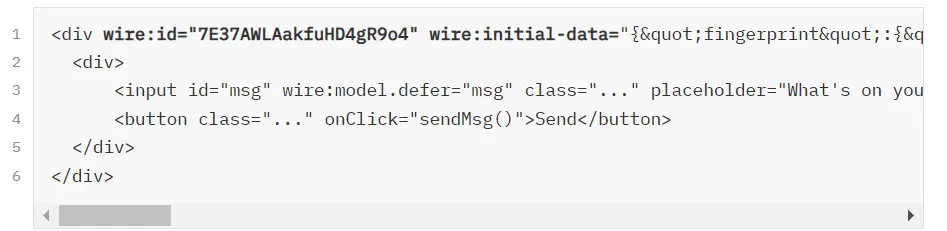
In the process of rendering this blade component, the server intelligently ( courtesy of Livewire ) renders the `<livewire:talk-to-me />` tag into a plain HTML version of the tag’s initialized view.

The content changes, but an initialized Livewire view generally looks like:

| ![An image containing a div tag of an initialized Livewire view. The tag contains "wire:id" and "wire:initial-data" metadata, and encloses a div tag. The second div tag encloses an input tag with several attributes: an "id" of msg, a "wire:model.defer" of msg, a redacted class, and a placeholder of "What's on your mind?". Below the input tag is a button tag with a redacted class and an "onClick" listener that can trigger a sendMsg function. This button encloses the label "Send".](https://fly.io/laravel-bytes/php-js-livewire/assets/2_init_wire.webp) |
| --- |
| Livewire adds two additional attributes in our view’s root tag: `wire:id` and `wire:initial-data` |

It comes enclosing the actual content of the view, with two additional attributes embedded into its root tag. Livewire embeds an id in `wire:id`, along with its metadata in `wire:initial-data`.

It is this `metadata` shared between server and client that wires the bridge of communication across PHP and JavaScript.

## The Wire that is Metadata

The Livewire class in the server shares its state with the client’s Livewire view by [embedding](https://github.com/livewire/livewire/blob/2.x/src/Response.php#L31) `metadata` within the `wire:initial-data` attribute.

| ![A screenshot of the page containing the chat input box and button mentioned in the 1_demo.gif image is shown to the left of the rendered html for the initialized livewire view described in 2_init_wire.webp](https://fly.io/laravel-bytes/php-js-livewire/assets/3_inspect.webp) |

| --- |
| The Livewire class’ details are jsonified into metadata, and embedded into `wire:initial-data` |

This metadata contains details regarding the identity of the Livewire class ( **fingerprint** ), the data the component needs to keep track of ( **serverMemo** ), and instructions on what needs to be handled on page load in the client ( **effects** ).

| Attribute | Description |
| --- | --- |
| **fingerprint** | Identifies the Livewire class( id, name, etc… ) |
| **serverMemo** | Data shared and persisted between server and client( i.e public attributes ) |
| **effects** | Details on effects the client needs to handle on page load |

On the client side, the Livewire view has its own [JavaScript](https://github.com/livewire/livewire/blob/2.x/js/index.js), courtesy of the `@livewireScripts` directive, that grabs our initialized Livewire view. The view’s root element is [passed](https://github.com/livewire/livewire/blob/2.x/js/index.js#L87) to Livewire’s JavaScript class [“Component”](https://github.com/livewire/livewire/blob/2.x/js/component/index.js#L31) which parses and stores the `metadata` embedded in its `wire:initial-data`.

Afterwards, it sets up the necessary JavaScript listeners and handlers matching the requirements of each wire attribute found in the Livewire view.

Once the required JavaScript has been set up for our wire attributes, our component is ready for user interaction.

## Building the Chatbot

The [Component](https://github.com/livewire/livewire/blob/2.x/js/component/index.js) class above handles interaction in our Livewire view. It records interactions in its `updateQueue` [list](https://github.com/livewire/livewire/blob/2.x/js/component/index.js#L39), and, at the right time, coordinates these interactions to the server by sending this list as the `updates` [metadata](https://github.com/livewire/livewire/blob/2.x/js/Message.js#L12) to the server.

Let’s create a simple chat bot page where users can send messages and receive response. It’s a bit rudimentary, but perfect for showcasing the role that the `updates` metadata plays in Livewire’s PHP-JS communication.
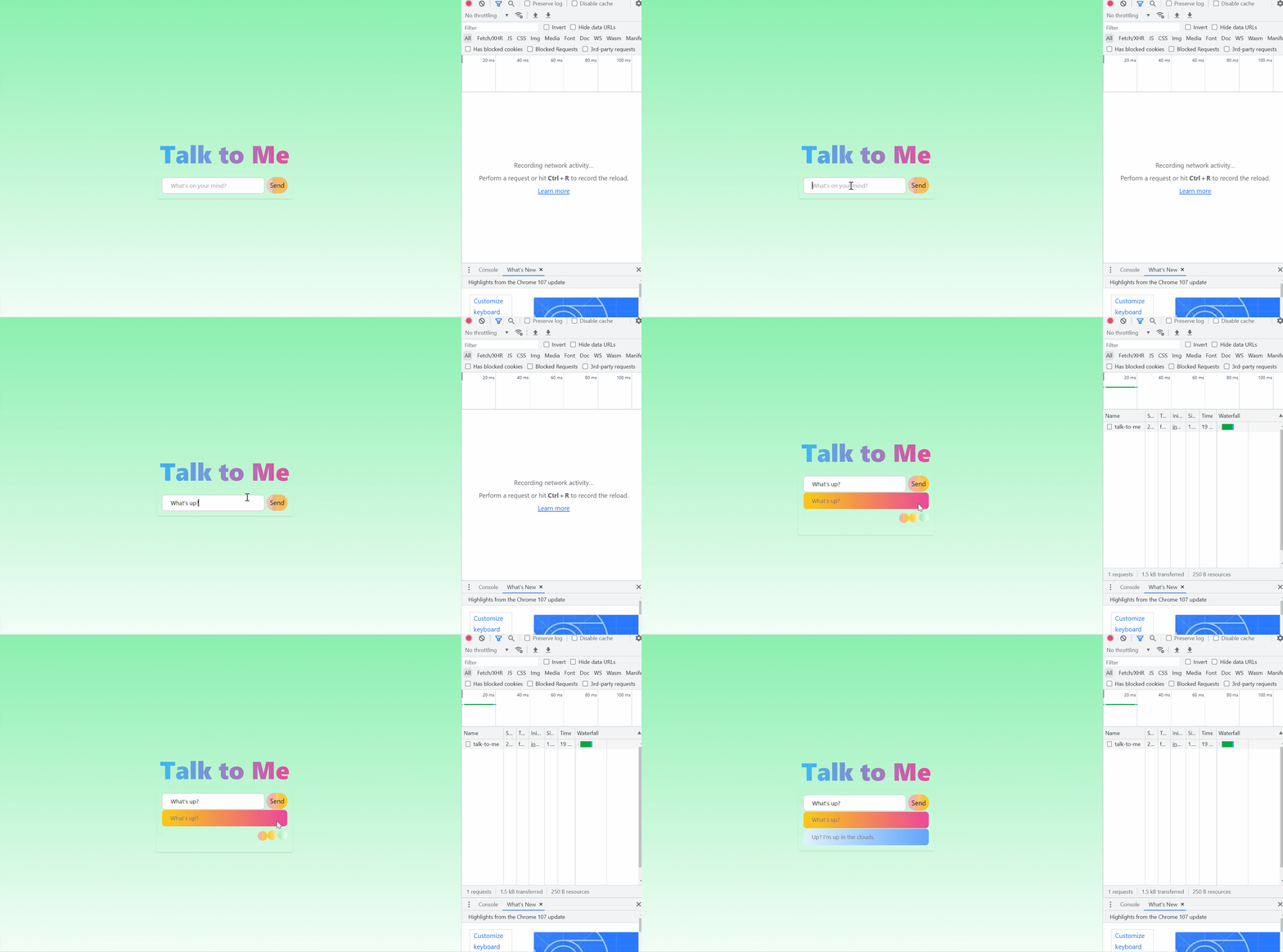
![The same gif image described in 1_demo.gif is shown left to an open browser's inspection table. A pointer moves towards the text box in the middle of the page, types a message, and clicks on a button next to it labeled "Send". The button click triggers a network request to be shown in the inspection table named "talk to me". A loader is shown and is eventually replaced with the message from the server.](https://fly.io/laravel-bytes/php-js-livewire/assets/4_demo_inspect.gif)

```
<input id="msg" wire:model.defer="msg" class="..." placeholder="...">
```

Our message box above, `<input wire:model.defer="msg"…`, is [wired](https://laravel-livewire.com/docs/2.x/properties#data-binding) to the `$msg` attribute in our Livewire PHP class.

[Wiring](https://laravel-livewire.com/docs/2.x/properties#data-binding) our input element with `wire:model` [creates a listener](https://github.com/livewire/livewire/blob/2.x/js/node_initializer.js#L29) that reacts to changes on its value. Every change is [pushed](https://github.com/livewire/livewire/blob/2.x/js/node_initializer.js#L94) by the listener as a `syncInput` update to the [Component’s](https://github.com/livewire/livewire/blob/2.x/js/component/index.js#L39) [updateQueue](https://github.com/livewire/livewire/blob/2.x/js/component/index.js#L216) list and is *immediately* sent to the server as part of the `updates` metadata.

However, we don’t want every change in our input field to send a request to our server! This is why we’ve included the [`.defer`](https://laravel-livewire.com/docs/2.x/properties#deferred-updating) chain to our wiring.

The `.defer` chain [instructs](https://github.com/livewire/livewire/blob/2.x/js/node_initializer.js#L91) its listener not to fire the `syncInput` instruction immediately, but instead to store up the instruction in the [`deferredActions`](https://github.com/livewire/livewire/blob/2.x/js/component/index.js#L196) list for [future processing](https://github.com/livewire/livewire/blob/2.x/js/component/index.js#L234).

Now that changes on our input field is deferred with `wire:model.defer`, let’s manually apply a listener on the user’s button click to send messages to our chat bot.

```
<button class="..." onClick="sendMsg()">Send</button>
```

This **onClick** listener will call our JS function `sendMsg()` to process our user’s message.

## Calling PHP methods from JavaScript

Above, we manually registered a button click to process our user’s chat message.

Now, let’s trigger the PHP `getResponse()` method from our JS function `sendMsg()`:

```
<script>
function sendMsg(){
  ...
+  // Get response from server regarding our latest message. 
+  @this.getResponse(); 
}
```

You might be wondering ( hmmm ), why not just bind the button with the `wire:click` [directive](https://laravel-livewire.com/docs/2.x/actions#introduction) to easily map with a method call in our Livewire class?

Sometimes, it pays to mix and match JS with Livewire. Doing so gives us flexibility in separating client concerns from server concerns.

We can create some JS magic first before we actually call our Livewire method:

```
+ let chat = [];
function sendMsg(){
+    // Add user's msg to our chat transcript 
+    // This chat transcript is only available in the client
+    chat.push( {
+      msg:sanitizeHTML(
+           document.getElementById('msg').value
+       ),
+      sender:0
+    });

+    // Display Messages in our chat list ui
+    refreshTranscript();

    // Ask our server to respond to user's latest message
    @this.getResponse(); 
}
```

In our case, we’d want to save the message sent by the user in a list and display the new message in our UI. Only then would we want to request for a response from the server.

`updateQueList` is mapped to the `updates` metadata sent as a [request payload](https://github.com/livewire/livewire/blob/2.x/js/Message.js#L12) to the server.

Triggering `@this.getResponse()` adds a `callMethod` update to our `updateQueue` list, and fires an immediate request to the server.

## Fly.io ❤️ Laravel

Fly your servers close to your users—and marvel at the speed of close proximity. Deploy globally on Fly in minutes!

[Deploy your Laravel app! →](https://docs.fly.io/laravel)

## Tossing back the Metadata

Above, the client received the server’s Livewire class metadata, displayed its Livewire HTML, and now with a user’s click of a button, the client needs to coordinate some processing to the server through `@this.getResponse()`.

How exactly does the Livewire view coordinate changes to the server?

It tosses the `metadata` back to the server.

| ![An image showing the request payload sent by the client during button click. The request payload contains the following metadata: fingerprint, serverMemo, and updates. fingerprint and serverMemo is the same metadata previously sent by the server to the client, while the updates metadata contains instructions like syncInput for the server to process.](https://fly.io/laravel-bytes/php-js-livewire/assets/5_mt_from_client.webp) |
| --- |
| The previous metadata `fingerprint` and `serverMemo` along with an `updates` attribute is sent to the server |

## FIFO updates by the Server

[What happens](https://github.com/livewire/livewire/blob/2.x/src/LivewireServiceProvider.php#L353) to subsequent requests our Livewire view makes to our Livewire class?

Thanks to the `fingerprint.name` sent back in `wire:initial-data`, our view sends a request to [/…/livewire/message/{fingerprint.name}](https://github.com/livewire/livewire/blob/2.x/js/connection/index.js#L41).

The server maps this to the proper Livewire class component, receives the `metadata` above from our client’s request payload, and “hydrates” the properties of the selected class component using `serverMemo`.

Afterwards, it performs any data-binding-updates ( `syncInput` ), action-calls ( `callMethod` ), and event-emissions ( `fireEvent` ) based on the instructions indicated in the `updates` metadata.

In our case, we had two instructions pushed in our client’s `updates` metadata:

| ![An image zooming in at the updates metadata sent by the client. It is an array containing two instructions. The first instruction is a `syncInput` with payload of id, name, and value. The second instruction is a `callMethod` instruction with a payload of id, method, and params.](https://fly.io/laravel-bytes/php-js-livewire/assets/6_mt_updates.webp) |
| --- |
| The updates metadata sent by the Livewire class contains instructions the Livewire class needs to process. |

The first instruction with type `syncInput` is the deferred action from changing the value of `<input id="msg" wire:model.defer="msg"`. This `syncInput` type instruction tells the Livewire class to update its attribute `$msg` with the value **hello** .

The second instruction is a `callMethod` type which triggers a `getResponse` method in our Livewire class. Which is basically this:

```
public function getResponse()
{
    $response = (new \App\Services\ChatBot)->processMessage($this->msg);
    $this->dispatchBrowserEvent(
      'response-received', ['response'=>$response]
    );
}
```

Our updated `$msg` attribute is sent to a custom class `\App\Services\ChatBot` for processing. Once we have the response, we simply call the Livewire `dispatchBrowserEvent()` method to add the event `“response-received”` in our effects list.

There are only two instructions in our `updates` list. After the last instruction is processed by the server, it proceeds with steps to dehyrdate its details into `metadata`, and finally sends back an updated `metadata` to the client:

| ![A screenshot of the response from the server. It contains metadata with attributes "effects" and "serverMemo".](https://fly.io/laravel-bytes/php-js-livewire/assets/7_mt_from_server.webp) |
| --- |
| The `serverMemo` contains updated data attributes, the `effects` contain change instructions needed in the Livewire view |

The metadata sent back by the server contains only two attributes: `effects` and `serverMemo`. `effects` contain updates for the client to process, and `serverMemo` contains the updated data of the component.

Now that we’ve received the server’s response, let’s add the response to our chat transcript and display it in our UI.

## PHP invokes JavaScript events

With the use of our Livewire `metadata`, we *can* actually [invoke](https://laravel-livewire.com/docs/2.x/events#browser) JS events from PHP. In our `getResponse()` method above, we called

```
$this->dispatchBrowserEvent('received-response',...)
```

Doing so pushes an event `response-received` to the `dispatches` array found inside the `effects` metdata sent back by the server:

![A screenshot of the server's response zooming in on the dispatches list contained in its effects metadata. The dispatches metadata is an array containing an object. The object contains two attributes. The first attribute named "event" has a string value of "response-received". The second attribute named "data" contains a key-value pair of "response" as the key and "Wazzup" as the string value.](https://fly.io/laravel-bytes/php-js-livewire/assets/8_mt_dispatches.webp)

Livewire’s JavaScript dispatches an event for each item included in the `effects.dispatches` array. That means we’ll have a `received-response` event dispatched in our client’s browser.

Right there, in one line of code, is JavaScript event creation from PHP 😎

## Reactive JavaScript

Now that we have the event created in our client, this means we can easily have our JavaScript listen to the event dispatched from our server’s `effects` metadata:

```
 window.addEventListener('response-received', event => {
    // Add the server's message to our chat transcript
    chat.push({
      msg: event.detail.response,
      sender: 1
    });

    // Refresh the chat transcript displayed 
    refreshTranscript();    
});
```

## JavaScript reads PHP vars

Let’s say we’d have some initialized PHP attribute from our Livewire class:

```
public $goodMsgs;

public function mount()
{
  $this->goodMsgs = (new \App\Services\ChatBot)->goodMessageList();
}
```

From our JavaScript we can simply use the `@js` directive to read this PHP variable:

```
<script>
- let hints = JSON.parse('<?php echo json_encode($goodMsgs) ?>') 
+ let hints = @js($goodMsgs);
```

The `@js` directive is one of the Livewire blade directives that Livewire class from the server scans the Livewire view for.

The server reads this and [renders](https://github.com/livewire/livewire/blob/2.x/src/LivewireBladeDirectives.php#L21) a proper JavaScript variable for us. This is pretty neat, because using it removes our need to manually add JSON parsing in JavaScript for reading objects or arrays.

## Brighter Magic with Clarity!

The more we look under the [magic](https://youtu.be/x5qHj6bGvn0?t=1014) of Livewire, the more astonishing its workings become.

Because now, not only do we know the surface level of instantaneous, seamless interaction of wire elements with user interaction.

Under the hood, we now know, that behind every PHP Livewire component, is a JavaScript [component](https://laravel-livewire.com/docs/2.x/inline-scripts#accessing-javascript-component-instance) coordinating interactions behind the scene.

PHP and JavaScript communication is bridged, all under the [magic](https://calebporzio.com/how-livewire-works-a-deep-dive) of the wire that is `metadata`. 🪄
